Maintaining and Cleaning LED Garden Lights Outdoor Solar for Longevity
Solar garden lights rarely fail all at once. They dim, run shorter, work some nights and skip others, and only then stop turning on. The fastest way to extend the useful life of your led garden lights outdoor solar is to work in a simple order: clean the panel, protect the battery, check the location, and inspect the connections before you blame the fixture. Most underperforming solar lights are fixed with soapy water, a few minutes of trimming, or a fresh rechargeable battery, not a new purchase. This guide walks through each maintenance step, gives you a year-round schedule, and closes with a troubleshooting order that stops you from replacing parts at random.
How to Tell Your Solar Lights Need Maintenance
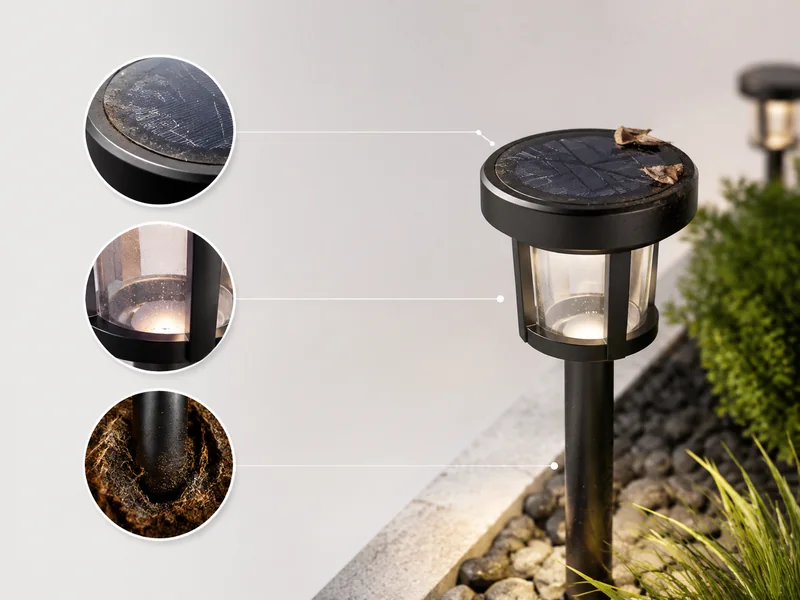
You do not need a multimeter or a technical background to know when a solar garden light needs attention. You need to notice which symptom you are seeing, because each symptom points at a different part of the system. The earlier you catch the symptom, the cheaper the fix usually is.
- Dim or shortened output: The light comes on, but it is noticeably fainter than it was, or it shuts off earlier than it used to. That combination usually means the panel is charging less or the battery is aging. It is the earliest and most common maintenance trigger, and it is worth acting on before the light fails completely.
- Intermittent operation: A light that works some nights and skips others is usually telling you the battery is tired or a connection is loose, not that the LED has failed. Intermittent faults are worth investigating because they are often cheap fixes. A loose connector can be re-seated by hand; a weak battery can be replaced in minutes.
- No light at all after a full sunny day: Before you assume the fixture is dead, check the panel, the location, the battery, and the connections in that order. A surprising number of dead-looking lights recover after a clean or a move, so a no-light condition is a starting point, not a verdict.
- Visible grime on the panel: Dust, pollen, bird droppings, and sticky films reduce the amount of sunlight a panel can capture. If you can see dirt, the light is already losing output. Cleaning is not optional touch-up at that point; it is the fix. A panel that is only half covered can still cast the whole light into short runtime.
- Debris and shade: Fallen leaves, overgrown branches, or a fixture that has settled into shadow cut charging hours even when the panel itself is clean. When output drops after a windy day or a growing season, look around the light before you look inside it. A leaf sitting on the panel for a week can block a meaningful share of a small panel’s surface.
- Normal seasonal dimming: Shorter days and cloudy stretches naturally shorten runtime. Solar lights run later in June than in December, and comparing current behavior with the sunniest month of the year is the fair test. If a light improved when summer came back, it may never have needed a repair.
The same logic applies to a whole string of lights. If one fixture in a row is fine and its neighbor is weak, the problem is nearly always local: the weak light’s panel, its battery, its placement, or its connection. When every light in the yard dims at the same time, the cause is usually shared, such as a stretch of cloudy weather or a tree that grew enough to shade the whole run. That distinction tells you where to spend your effort.
Step-by-Step: How to Clean Solar Panels, Glass, and Fixture Housings
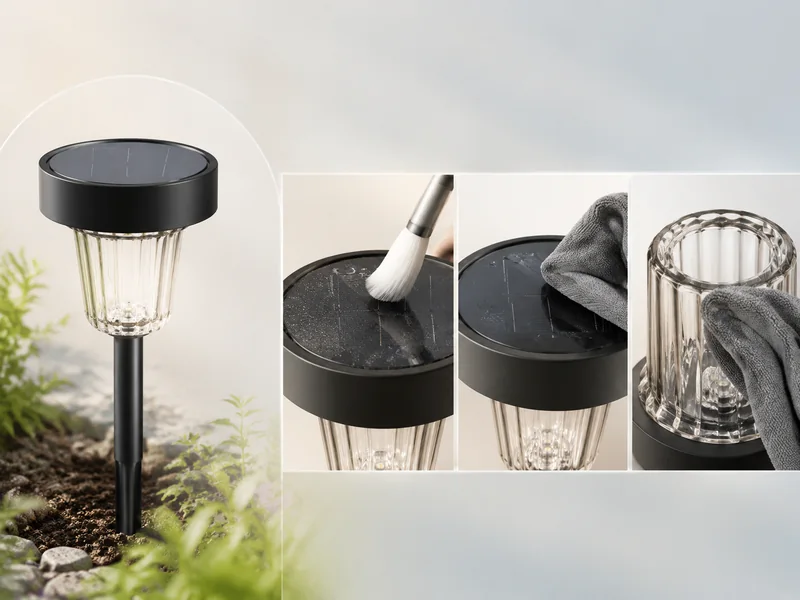
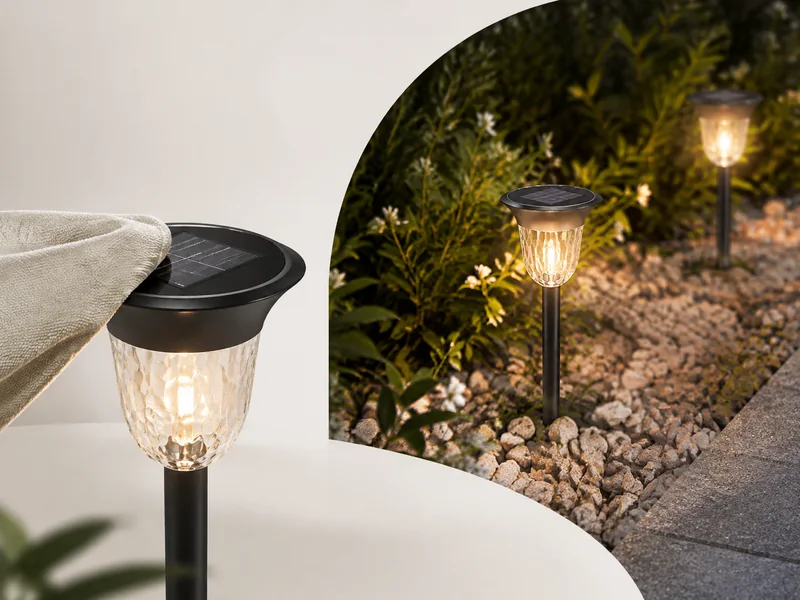
Clean solar panels with a soft-bristled brush for loose debris, then a non-abrasive cloth dipped in mild soapy water, then rinse with a damp cloth and dry. The whole job takes a few minutes per fixture, and the only hard rule is to keep water out of seams, switches, and sensor windows. The efficiency of a solar light depends on how much sunlight the panel can capture, and a panel that is covered in dirt will not perform at full capacity no matter how good the battery is.
- Inspect before you wipe. Look for cracks, moisture inside the lens, and loose parts. If water has already entered the housing, cleaning will not fix the fault, and replacement is the realistic outcome. Cleaning a damaged fixture can push dirt or moisture deeper into the opening.
- Dust first. Use a soft-bristled brush or a dry microfiber cloth to remove loose grit. This step matters because dry dust is made of abrasive particles; wiping it across the panel with a wet cloth can leave fine scratches that cloud the surface over time.
- Wash the panel. Dip a non-abrasive cloth in warm water with a few drops of mild dish soap and wipe the full surface with gentle, overlapping strokes. Keep the cloth damp, not soaking, so water does not run into the seams. You do not need a specialty solar panel cleaner; mild soapy water is the simplest thing to reach for because it does not leave a film.
- Rinse and dry. Rinse with a damp cloth or a very light spray, then dry with a soft cloth. Never blast water into seams, hinges, or switch areas, and never submerge a fixture unless its rating says it can handle immersion. A quick dry also prevents water spots that can make a clean panel look dirty again.
- Clean the glass or globe the same way. A hazed or dirty lens cuts visible light even when the panel is spotless. The lens is part of the glowing fixture, not just the panel, so it deserves the same gentle treatment. Use a soft cloth and dry it fully so minerals in the water do not leave streaks.
- Match your methods to the fixture’s IP rating. The IP (Ingress Protection) code is defined by the International Electrotechnical Commission in IEC 60529 and describes how well a housing resists dust and water. The first digit covers solid particles; the second covers water. An IP67 fixture, for example, is protected against dust and can handle immersion in fresh water to about one meter for up to 30 minutes, while a fixture with a low second digit is built only for dripping water, not a hose. Water ratings are not cumulative, so a fixture that passes the immersion test is not automatically rated for high-pressure jets. If your fixture has no readable rating, treat it as low-rated and clean it with a damp cloth only.
- Use the cleaning pass as a damage check. Note corrosion, cracks, or water ingress while you are handling each fixture. A small crack around the lens or a greenish crust on the terminals is much easier to address now than after a winter of moisture.
If you clean several lights at once, do the panels first and the lenses immediately after, before you lose track of which fixture is which. Cleaning once a month during the growing season and after every major storm keeps the routine from becoming a full afternoon project.
Battery Care: Charge, Let It Rest, and Replace at the Right Time
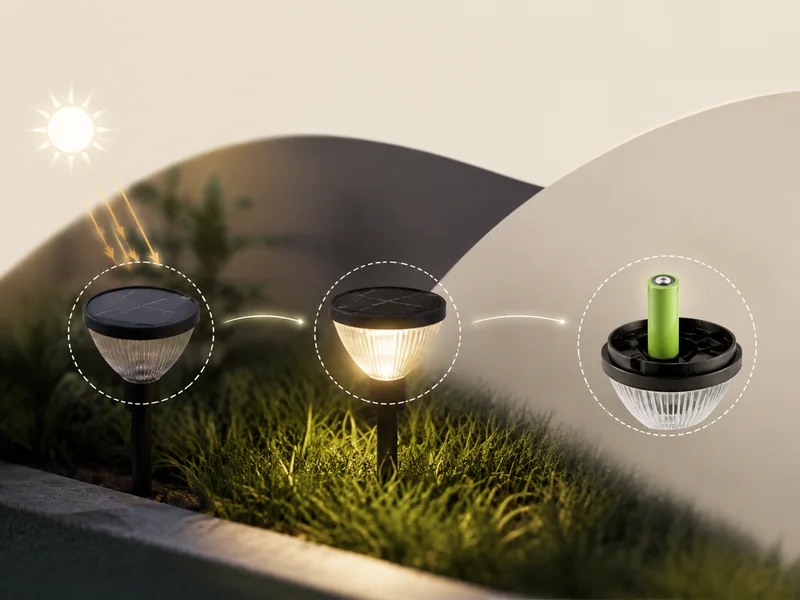
Battery care comes down to four habits: charge fully before first use, avoid long idle spells, give the battery a rest, and replace it when performance stays poor after full sunny days. The battery is an essential part of the system and, like any rechargeable cell, it has a limited service life. It is also the part owners often misdiagnose first.
- Charge fully before first use. Follow the manufacturer’s first-use instruction, which usually means letting a new light sit in full sun with the switch off so the battery starts its first night topped up.
- Avoid long idle spells. If a fixture will sit unused for weeks, switch it off rather than letting it drain slowly. The point is not to avoid using the light; it is to avoid leaving it in a half-charged state for months. This matters most for lights that are seasonal or for fixtures stored over winter.
- Give the battery a rest now and then. Switching a fixture off for two or three clear days lets the panel refill the battery without the LED drawing it down. This can revive a light whose runtime has slowly shrunk, and it is a free test before you spend money on a replacement.
- Turn fixtures off during extended rain. On cloudy, rainy days the panel cannot refill what the bulb drains. If your fixture has a manual on/off switch, use it during long wet spells so the battery is not being drained night after night while it cannot recharge. A battery that is pulled down repeatedly without a full recharge will not serve you well for long.
- Identify the battery before you replace it. Remove the battery and read the printing on it for type, size, and voltage. The label is the best guide to the correct replacement, so photograph it or take it with you. Do not assume that any rechargeable battery of the right size will do; the printed label tells you what the fixture expects, and matching it is the reliable move.
- Replace based on clear signs. Corrosion is a common sign that a battery is approaching the end of its life, and so is poor performance that does not improve: the light stays dim after a full sunny day, dies well before dawn, works only some nights, or will not run at all after the panel and location check out. Notice the combination. A single dim night after a storm is not a battery problem; the same behavior after three sunny days is.
- Dispose of old batteries responsibly. Do not puncture, crush, or burn them, and do not assume they belong in household trash. Battery recycling rules vary by municipality, so check the drop-off locations near you. Many home improvement stores and recycling centers accept rechargeable batteries.
One habit saves more batteries than anything else: hold the fixture in your hand before you judge it. If the panel is dirty, the light is in shade, or the switch has been left on during a rainy week, the battery may be fine. Rule those out first, and you will replace far fewer cells.
Inspect Wires, Connections, and Fixture Hardware
cURL Too many subrequests by single Worker invocation. To configure this limit, refer to https://developers.cloudflare.com/workers/wrangler/configuration/#limits
- cURL Too many subrequests by single Worker invocation. To configure this limit, refer to https://developers.cloudflare.com/workers/wrangler/configuration/#limits
- cURL Too many subrequests by single Worker invocation. To configure this limit, refer to https://developers.cloudflare.com/workers/wrangler/configuration/#limits
- cURL Too many subrequests by single Worker invocation. To configure this limit, refer to https://developers.cloudflare.com/workers/wrangler/configuration/#limits
- cURL Too many subrequests by single Worker invocation. To configure this limit, refer to https://developers.cloudflare.com/workers/wrangler/configuration/#limits
- cURL Too many subrequests by single Worker invocation. To configure this limit, refer to https://developers.cloudflare.com/workers/wrangler/configuration/#limits
- cURL Too many subrequests by single Worker invocation. To configure this limit, refer to https://developers.cloudflare.com/workers/wrangler/configuration/#limits
cURL Too many subrequests by single Worker invocation. To configure this limit, refer to https://developers.cloudflare.com/workers/wrangler/configuration/#limits
cURL Too many subrequests by single Worker invocation. To configure this limit, refer to https://developers.cloudflare.com/workers/wrangler/configuration/#limits
cURL Too many subrequests by single Worker invocation. To configure this limit, refer to https://developers.cloudflare.com/workers/wrangler/configuration/#limits
- cURL Too many subrequests by single Worker invocation. To configure this limit, refer to https://developers.cloudflare.com/workers/wrangler/configuration/#limits
- cURL Too many subrequests by single Worker invocation. To configure this limit, refer to https://developers.cloudflare.com/workers/wrangler/configuration/#limits
- cURL Too many subrequests by single Worker invocation. To configure this limit, refer to https://developers.cloudflare.com/workers/wrangler/configuration/#limits
- cURL Too many subrequests by single Worker invocation. To configure this limit, refer to https://developers.cloudflare.com/workers/wrangler/configuration/#limits
- cURL Too many subrequests by single Worker invocation. To configure this limit, refer to https://developers.cloudflare.com/workers/wrangler/configuration/#limits
- cURL Too many subrequests by single Worker invocation. To configure this limit, refer to https://developers.cloudflare.com/workers/wrangler/configuration/#limits
cURL Too many subrequests by single Worker invocation. To configure this limit, refer to https://developers.cloudflare.com/workers/wrangler/configuration/#limits
cURL Too many subrequests by single Worker invocation. To configure this limit, refer to https://developers.cloudflare.com/workers/wrangler/configuration/#limits
cURL Too many subrequests by single Worker invocation. To configure this limit, refer to https://developers.cloudflare.com/workers/wrangler/configuration/#limits
| 作業 | Weekly / every other week | 毎月 | Spring | Summer | Fall | Winter |
|---|---|---|---|---|---|---|
| Panels and lenses | Wipe off dust, pollen, and debris | Full clean with mild soapy water, rinse, and dry | Deep-clean the film left by winter and inspect after storage | Wipe more often during dry, dusty weeks | Clear leaves and sap after storms | Clear snow after storms or store removable fixtures inside |
| Battery | Watch runtime for sudden drops | Confirm runtime still matches the season | Check for corrosion and charge fully after any long storage | Look for swelling, leakage, or terminal crust | Decide before frost whether fixtures will be stored | Remove batteries if you bring fixtures inside |
| Wires and connections | Quick visual check of cables and terminals | Inspect connectors, wires, and housing seals | Check for animal damage from the cold months | Inspect after string-trimmer season | Re-seat dry, undamaged connections | Inspect before storage or before heavy rain season |
| Vegetation and debris | Clear anything sitting on the panel | Trim growth that is close to fixtures | Prune branches as the sun path rises | Keep grass and weeds away from low fixtures | Remove fallen leaves repeatedly | Keep snow from blocking panels |
| Weather handling | Check after heavy storms | — | Confirm fixtures that stayed out are still sealed | — | Use manual-off mode during long wet spells | Use manual-off during rainy stretches; store removable fixtures in snow climates |
cURL Too many subrequests by single Worker invocation. To configure this limit, refer to https://developers.cloudflare.com/workers/wrangler/configuration/#limits
cURL Too many subrequests by single Worker invocation. To configure this limit, refer to https://developers.cloudflare.com/workers/wrangler/configuration/#limits
cURL Too many subrequests by single Worker invocation. To configure this limit, refer to https://developers.cloudflare.com/workers/wrangler/configuration/#limits
cURL Too many subrequests by single Worker invocation. To configure this limit, refer to https://developers.cloudflare.com/workers/wrangler/configuration/#limits
cURL Too many subrequests by single Worker invocation. To configure this limit, refer to https://developers.cloudflare.com/workers/wrangler/configuration/#limits
- cURL Too many subrequests by single Worker invocation. To configure this limit, refer to https://developers.cloudflare.com/workers/wrangler/configuration/#limits
- cURL Too many subrequests by single Worker invocation. To configure this limit, refer to https://developers.cloudflare.com/workers/wrangler/configuration/#limits
- cURL Too many subrequests by single Worker invocation. To configure this limit, refer to https://developers.cloudflare.com/workers/wrangler/configuration/#limits
- cURL Too many subrequests by single Worker invocation. To configure this limit, refer to https://developers.cloudflare.com/workers/wrangler/configuration/#limits
- cURL Too many subrequests by single Worker invocation. To configure this limit, refer to https://developers.cloudflare.com/workers/wrangler/configuration/#limits
cURL Too many subrequests by single Worker invocation. To configure this limit, refer to https://developers.cloudflare.com/workers/wrangler/configuration/#limits
| cURL Too many subrequests by single Worker invocation. To configure this limit, refer to https://developers.cloudflare.com/workers/wrangler/configuration/#limits | cURL Too many subrequests by single Worker invocation. To configure this limit, refer to https://developers.cloudflare.com/workers/wrangler/configuration/#limits | cURL Too many subrequests by single Worker invocation. To configure this limit, refer to https://developers.cloudflare.com/workers/wrangler/configuration/#limits |
|---|---|---|
| cURL Too many subrequests by single Worker invocation. To configure this limit, refer to https://developers.cloudflare.com/workers/wrangler/configuration/#limits | cURL Too many subrequests by single Worker invocation. To configure this limit, refer to https://developers.cloudflare.com/workers/wrangler/configuration/#limits | cURL Too many subrequests by single Worker invocation. To configure this limit, refer to https://developers.cloudflare.com/workers/wrangler/configuration/#limits |
| cURL Too many subrequests by single Worker invocation. To configure this limit, refer to https://developers.cloudflare.com/workers/wrangler/configuration/#limits | cURL Too many subrequests by single Worker invocation. To configure this limit, refer to https://developers.cloudflare.com/workers/wrangler/configuration/#limits | cURL Too many subrequests by single Worker invocation. To configure this limit, refer to https://developers.cloudflare.com/workers/wrangler/configuration/#limits |
| cURL Too many subrequests by single Worker invocation. To configure this limit, refer to https://developers.cloudflare.com/workers/wrangler/configuration/#limits | Tired battery; loose or corroded connection; shifting shade | Watch for three nights, check and re-seat connections, replace the battery if the pattern continues |
| Flickering | Loose connection; corroded terminals; moisture inside the housing | Dry the terminals, re-seat connections, and inspect the lens and seals for cracks |
| Fails after rain | Water ingress; low charge from cloudy days | Wipe the fixture dry, check the seals, and use the manual off switch during long wet spells |
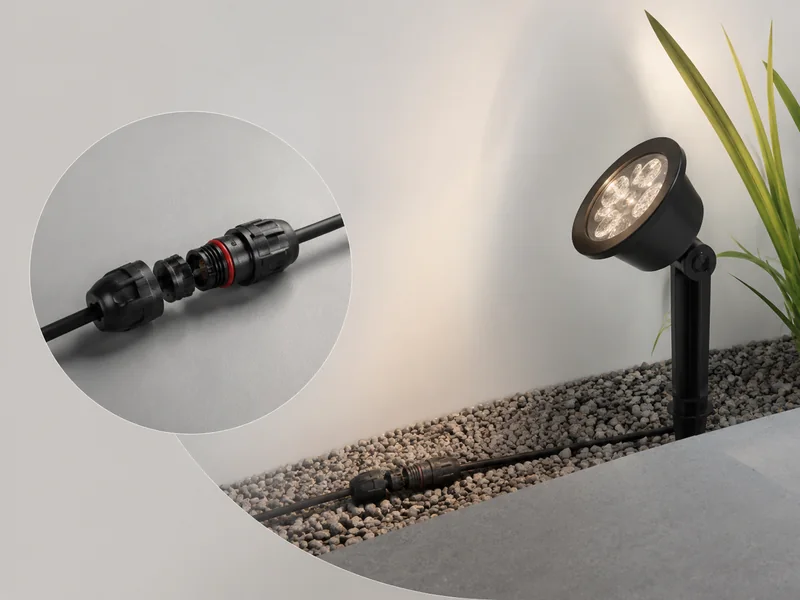
The replacement decision is where the routine stops being about cleaning and starts being about direction. A new solar fixture makes sense when the spot gets real direct sun and you will keep up with the cleaning and battery routine. A 12-volt low-voltage landscape lighting system changes the math: systems like that pair with Energy Star certified drivers, use corrosion-resistant materials such as stainless steel and composite, include waterproof connectors, and offer photocell and dimmable controls, so they remove the two solar-specific chores, panel cleaning and battery swapping, from the list.
Most solar garden lights do not need to be replaced; they need to be cleaned, moved, or given a fresh battery. Run the five checks in order, keep the weekly and monthly rows of the schedule, and you will catch fixable issues while they are still small. When a fixture finally fails after all five checks pass, the decision is clearer: buy another solar light only if the location gets real sun and you are willing to keep up the routine, or compare a wired alternative. Low-voltage landscape lighting is worth reviewing at that point because it takes panel cleaning and battery swaps off your list entirely. Either way, observe first, test the cheap fixes first, and replace only when the evidence says the fixture itself is done.
関連記事
Commercial LED Step Lights: How to Specify Them for Multi-Family and Hospitality Projects

cURL Too many subrequests by single Worker invocation. To configure this limit, refer to https://developers.cloudflare.com/workers/wrangler/configuration/#limits

Dusk to Dawn LED Step Lights: Automatic Outdoor Stair Lighting That Turns On at Night
Dark steps can turn one late-night walk into a guessing game. Dusk to Dawn LED Step Lights cut the drama, using photocells to switch on...

How to Install LED Step Lights: A Step-by-Step Guide for Outdoor Stairs
Learn how to install LED step lights on outdoor stairs with the right IP67 fixtures, drivers, wiring, and recessed or surface-mount specs.
IP Rating for Outdoor Step Lights: How to Choose the Right Waterproof Protection
One wrong IP rating for outdoor step lights can turn a sleek stairway into a maintenance headache, with moisture inviting corrosion, co...

How to Choose the Right Low Voltage Transformer for LED Step Lights
Choosing the right low voltage transformer for LED step lights is one of the most important decisions in any outdoor stair lighting pro...

How to Choose the Right Color Temperature for LED Step Lights
Choosing the right LED step light color temperature is one of the most consequential decisions in any outdoor stair-lighting installati...
Maintaining and Cleaning LED Garden Lights Outdoor Solar for Longevity
Learn how to maintain and clean LED garden lights outdoor solar with a step-by-step panel and lens cleaning process, battery care tips, wiring checks, a seasonal schedule, and troubleshooting in the right order.

LED Step Lights for Brick Walls: Avoid These 5 Mistakes
LED step lights for brick walls fail when drivers are undersized, seals are weak, or recess depth is wrong. Avoid these 5 mistakes and keep your brick wall steps glowing evenly and safely.
10 Inspiring Ideas for LED Stair Lights Outdoor
Explore 10 outdoor LED stair lighting ideas, plus practical guidance on fixture types, placement, power options, glare control, and planning checks.

Outdoor LED Step Lights for Retaining Brick Walls
Enhance safety and curb appeal with outdoor LED step lights for retaining brick walls. Explore design tips, mounting methods, and retrofit options.

10 Stunning Ideas Using Motion Activated LED Strips for Stairs
Why Motion Activated LED Strips for Stairs Are a Must-Have Upgrade
Upgrading your stairway with motion activated LED strips for stairs ...

Designing with Matte Black Outdoor LED Step Lights: 7 Ideas
Discover 7 design ideas for matte black outdoor LED step lights. From recessed safety lighting to motion sensor and dusk-to-dawn options, elevate your outdoor stairs with style and function.